6.4 Intro to Data Science: Dynamic Visualizations
- In this section, we make things “come alive” with dynamic visualizations.
The Law of Large Numbers
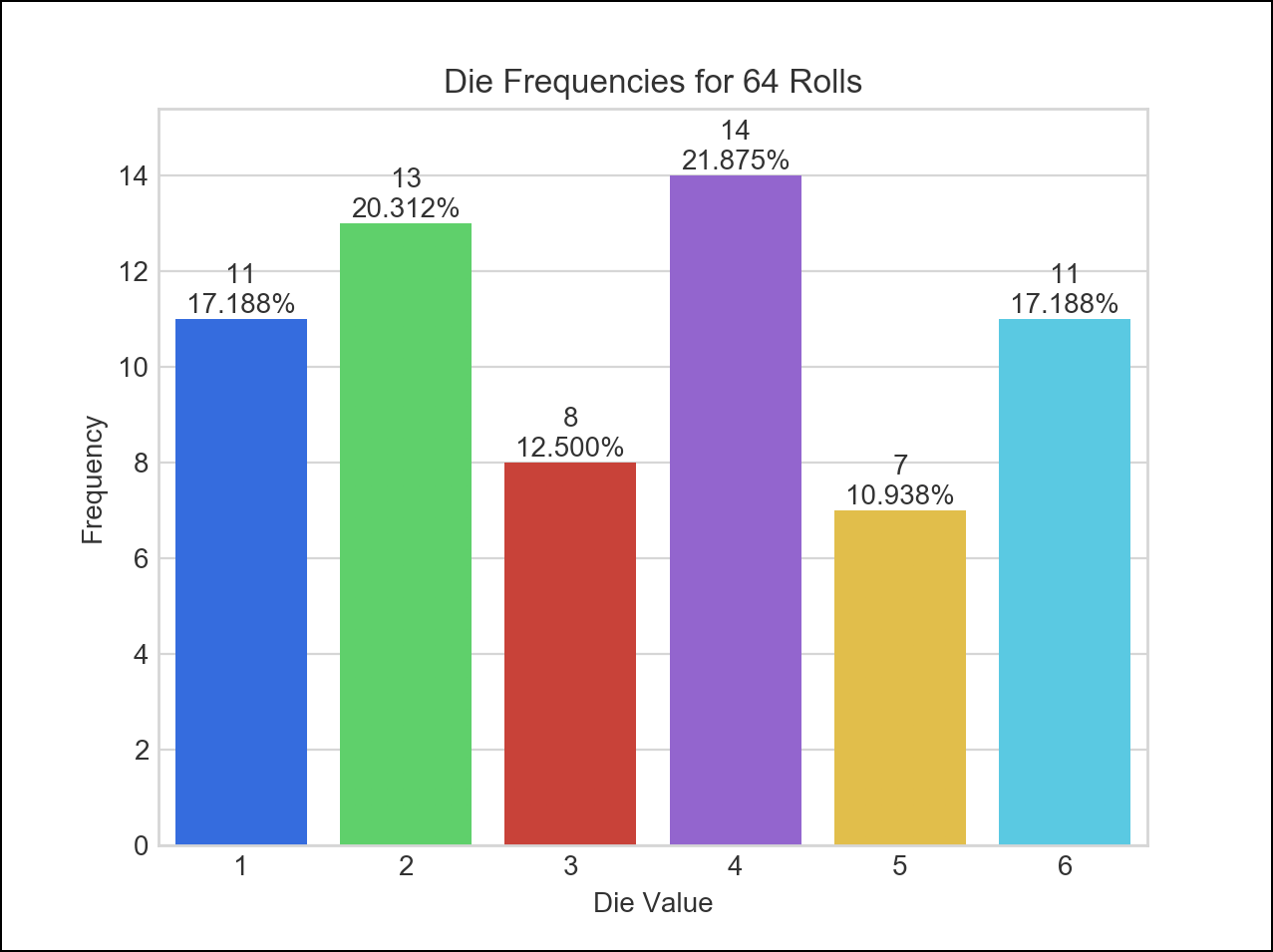
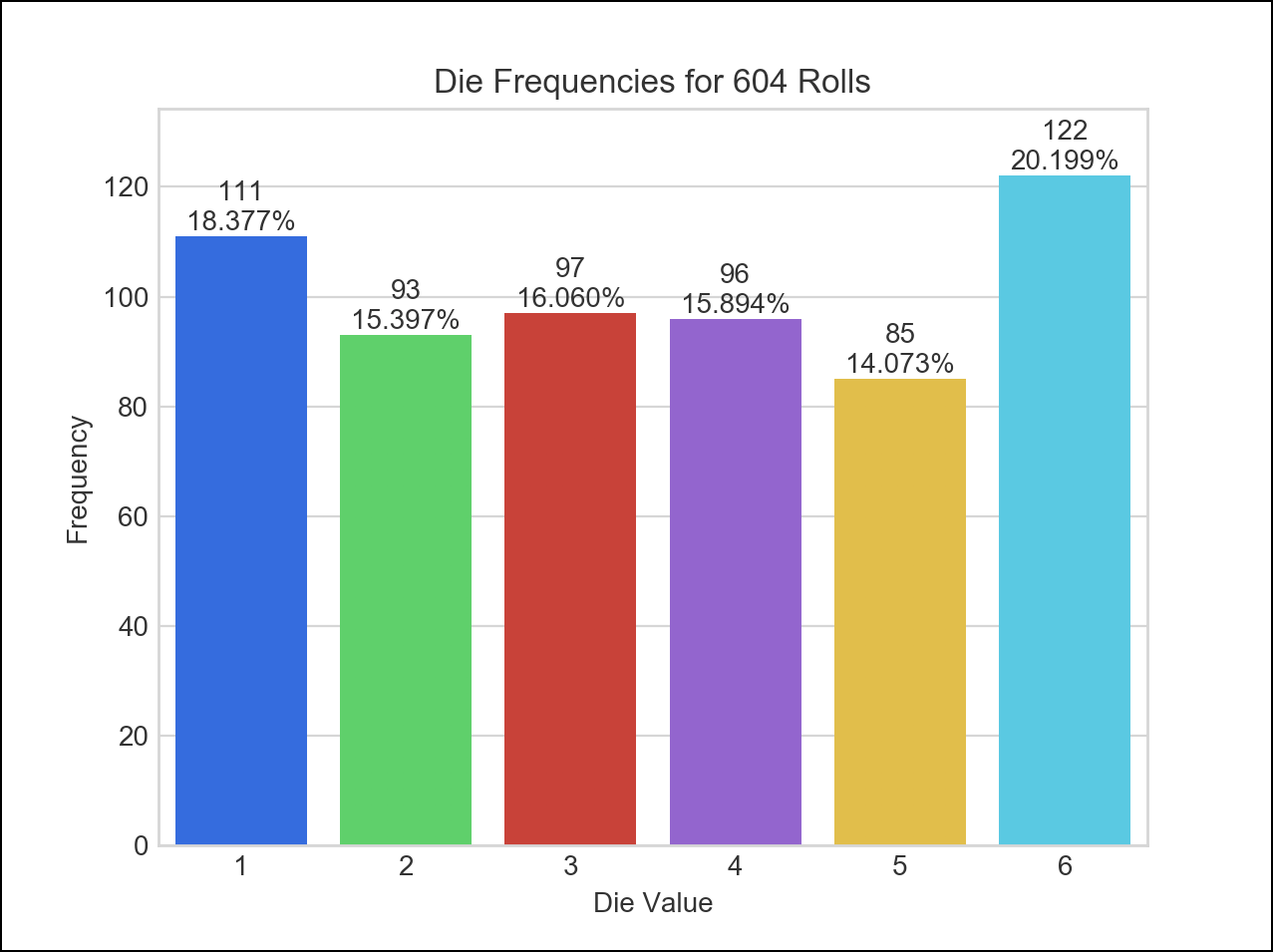
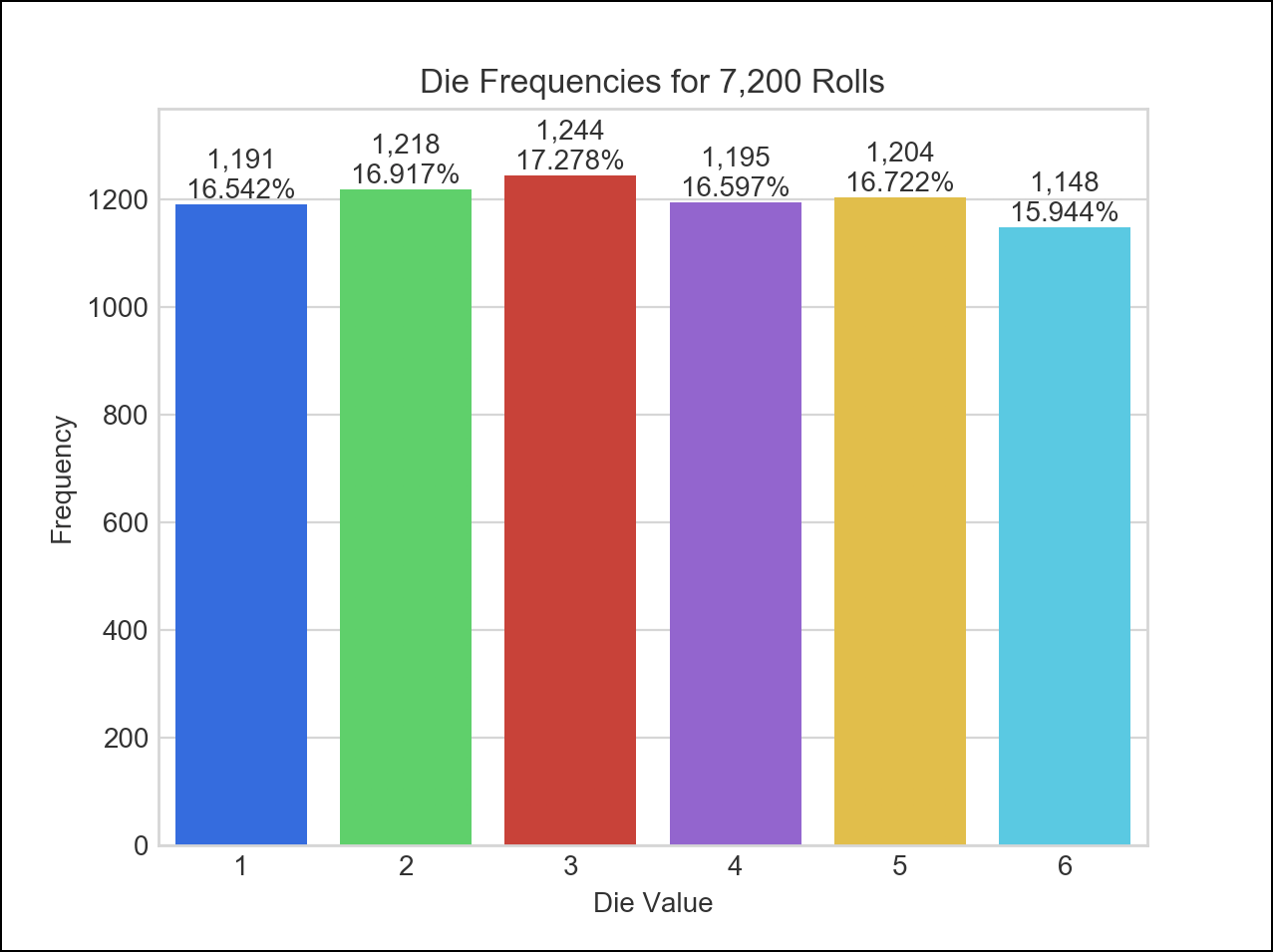
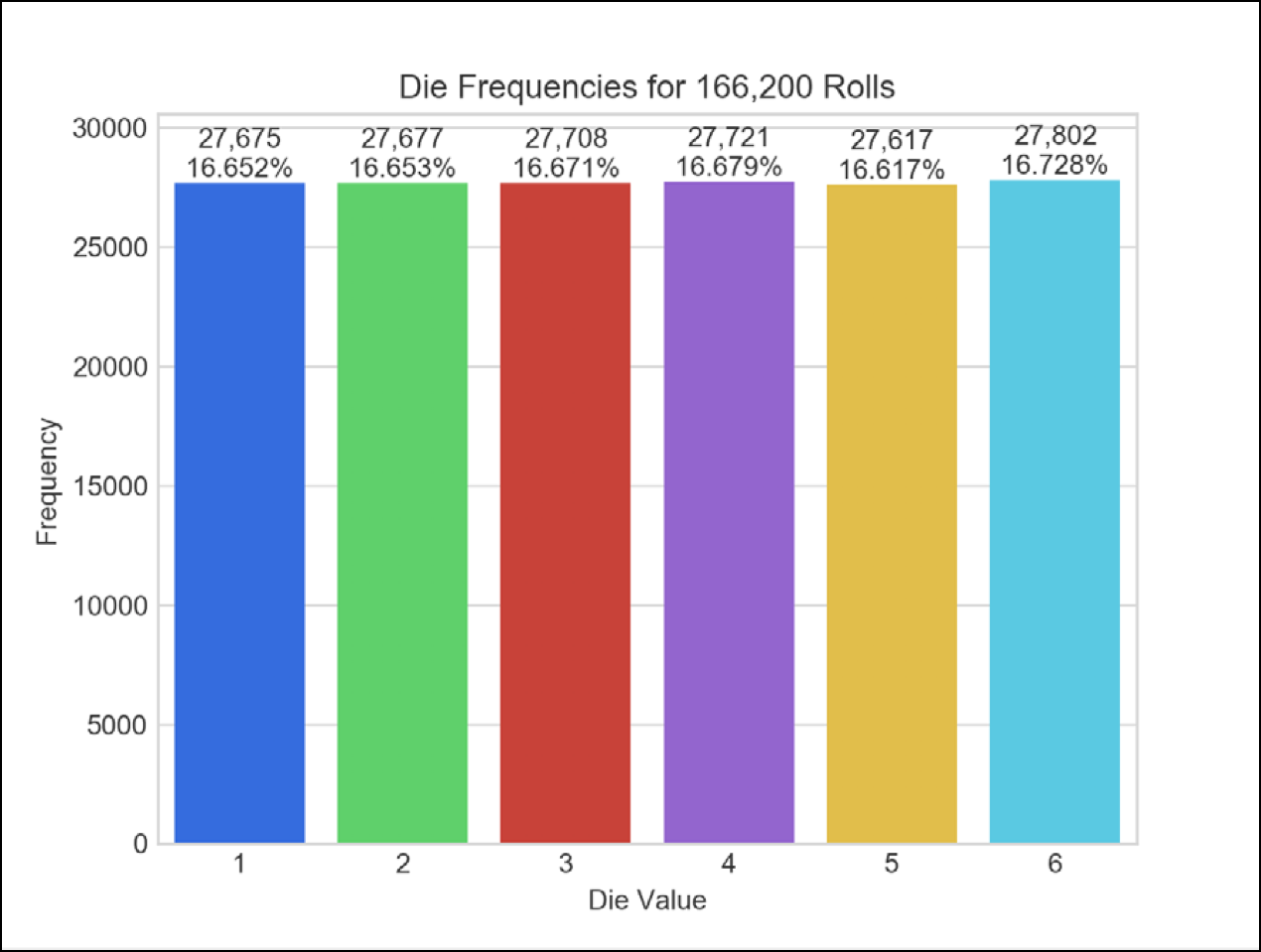
- For a six-sided die, each value 1 through 6 should occur one-sixth of the time, so the probability of any one of these values occurring is 1/6th or about 16.667%.
- In the dynamic visualization, the more rolls we perform, the closer each die value’s percentage of the total rolls gets to 16.667% and the heights of the bars gradually become about the same.
- This is a manifestation of the law of large numbers.
6.4.1 How Dynamic Visualization Works
- The Matplotlib
animationmodule’sFuncAnimationfunction, updates a visualization dynamically.
Animation Frames
FuncAnimationdrives a frame-by-frame animation.- Each animation frame specifies what to change during one plot update.
- Stringing together many updates over time creates an animation.
- This example displays an animation frame every 33 milliseconds—yielding approximately 30 (1000 / 33) frames-per-second.
Running RollDieDynamic.py
- Access the command line in Jupyter with File > New > Terminal.
cd ch06.- Execute
ipython RollDieDynamic.py 6000 1
- 6000 is the number of animation frames to display.
- 1 is the number of die rolls to summarize in each animation frame.
- To see the law of large numbers in action, increase the execution speed by rolling the die more times per animation frame:
ipython RollDieDynamic.py 10000 600
- In this case,
FuncAnimationperform 10,000 updates, with 600 rolls-per-frame for a total of 6,000,000 rolls.
Sample Executions
6.4.2 Implementing a Dynamic Visualization
Importing the Matplotlib animation Module
- We focus primarily on the new features used in this example.
- We import the Matplotlib
animationmodule to access`FuncAnimation.
# RollDieDynamic.py
"""Dynamically graphing frequencies of die rolls."""
from matplotlib import animation
import matplotlib.pyplot as plt
import random
import seaborn as sns
import sys
Function update
def update(frame_number, rolls, faces, frequencies):
    """Configures bar plot contents for each animation frame."""
FuncAnimationcalls theupdatefunction once per animation frame.- This function must receive at least one argument.
- Parameters:
frame_number—The next value fromFuncAnimation’sframesargument, which we’ll discuss momentarily. ThoughFuncAnimationrequires theupdatefunction to have this parameter, we do not use it in thisupdatefunction.rolls—The number of die rolls per animation frame.faces—The die face values used as labels along the graph’s x-axis.frequencies—The list in which we summarize the die frequencies.
We discuss the rest of the function’s body below.
Function update: Rolling the Die and Updating the frequencies List
- Roll the die
rollstimes and increment the appropriatefrequencieselement for each roll.
# roll die and update frequencies
    for i in range(rolls):
        frequencies[random.randrange(1, 7) - 1] += 1
Function update: Configuring the Bar Plot and Text
- The
matplotlib.pyplotmodule’scla(clear axes) function removes the existing bar plot elements before drawing new ones for the current animation frame. - We discussed the other code below in the previous chapter’s Intro to Data Science section.
# reconfigure plot for updated die frequencies
    plt.cla()  # clear old contents contents of current Figure
    axes = sns.barplot(faces, frequencies, palette='bright')  # new bars
    axes.set_title(f'Die Frequencies for {sum(frequencies):,} Rolls')
    axes.set(xlabel='Die Value', ylabel='Frequency')
    axes.set_ylim(top=max(frequencies) * 1.10)  # scale y-axis by 10%

    # display frequency & percentage above each patch (bar)
    for bar, frequency in zip(axes.patches, frequencies):
        text_x = bar.get_x() + bar.get_width() / 2.0
        text_y = bar.get_height()
        text = f'{frequency:,}\n{frequency / sum(frequencies):.3%}'
        axes.text(text_x, text_y, text, ha='center', va='bottom')
Variables Used to Configure the Graph and Maintain State
- The
sysmodule’sargvlist contains the script’s command-line arguments. - The
matplotlib.pyplotmodule’sfigurefunction gets aFigureobject in whichFuncAnimationdisplays the animation — one ofFuncAnimation’s required arguments.
# read command-line arguments for number of frames and rolls per frame
number_of_frames = int(sys.argv[1])
rolls_per_frame = int(sys.argv[2])

sns.set_style('whitegrid')  # white background with gray grid lines
figure = plt.figure('Rolling a Six-Sided Die')  # Figure for animation
values = list(range(1, 7))  # die faces for display on x-axis
frequencies = [0] * 6  # six-element list of die frequencies
Calling the animation Module’s FuncAnimation Function
FuncAnimationreturns an object representing the animation.- Though this is not used explicitly, you must store the reference to the animation; otherwise, Python immediately terminates the animation and returns its memory to the system.
# configure and start animation that calls function update
die_animation = animation.FuncAnimation(
    figure, update, repeat=False, frames=number_of_frames, interval=33,
    fargs=(rolls_per_frame, values, frequencies))

plt.show()  # display window
FuncAnimation has two required arguments:
figure—theFigureobject in which to display the animation, andupdate—the function to call once per animation frame.Optional keyword arguments:
repeat—IfTrue(the default), when the animation completes it restarts from the beginning.frames—The total number of animation frames, which controls how many timesFunctAnimationcallsupdate.interval—The number of milliseconds between animation frames (the default is 200).fargs(short for “function arguments”)—A tuple of other arguments to pass to the function you specified inFuncAnimation’s second argument.
FuncAnimation’s other optional arguments
©1992–2020 by Pearson Education, Inc. All Rights Reserved. This content is based on Chapter 6 of the book Intro to Python for Computer Science and Data Science: Learning to Program with AI, Big Data and the Cloud.
DISCLAIMER: The authors and publisher of this book have used their best efforts in preparing the book. These efforts include the development, research, and testing of the theories and programs to determine their effectiveness. The authors and publisher make no warranty of any kind, expressed or implied, with regard to these programs or to the documentation contained in these books. The authors and publisher shall not be liable in any event for incidental or consequential damages in connection with, or arising out of, the furnishing, performance, or use of these programs.